Product goal
A BBS-style network where computers feel like places again.
Terminal-native station network / self-hosted app protocol
PhosphorNet is an Open Source, small network where stations host doors, the client draws the screen locally, and you can still see who and what you are talking to. It is built for people who like terminals, self-hosting, and systems with clear boundaries.
Why it exists
It gives you a station you enter, a door you open, a name you recognize, and a system you can inspect. It keeps the social feeling of an old BBS without handing remote code control over your terminal.
01 / Overview
The project borrows from BBSes, old online services, and classic terminal networking, but it is not a browser, not SSH, and not a remote code runner. The client draws the interface locally while the node handles the actual door logic.
The point is not to hide the network. The point is to make identity, access, routing, and interaction visible enough that the station feels small, understandable, and actually yours.
The client draws.
phosphord thinks.
doors define behavior.
switchboard helps nodes connect.
Ed25519 signs in.
WebSocket carries the session.
SQLite remembers.A BBS-style network where computers feel like places again.
Small Go binaries, JSON screens, Ed25519 login, SQLite state, and clear boundaries.
Keep federation, DHTs, mobile, browser clients, and big social systems out of the first slice.
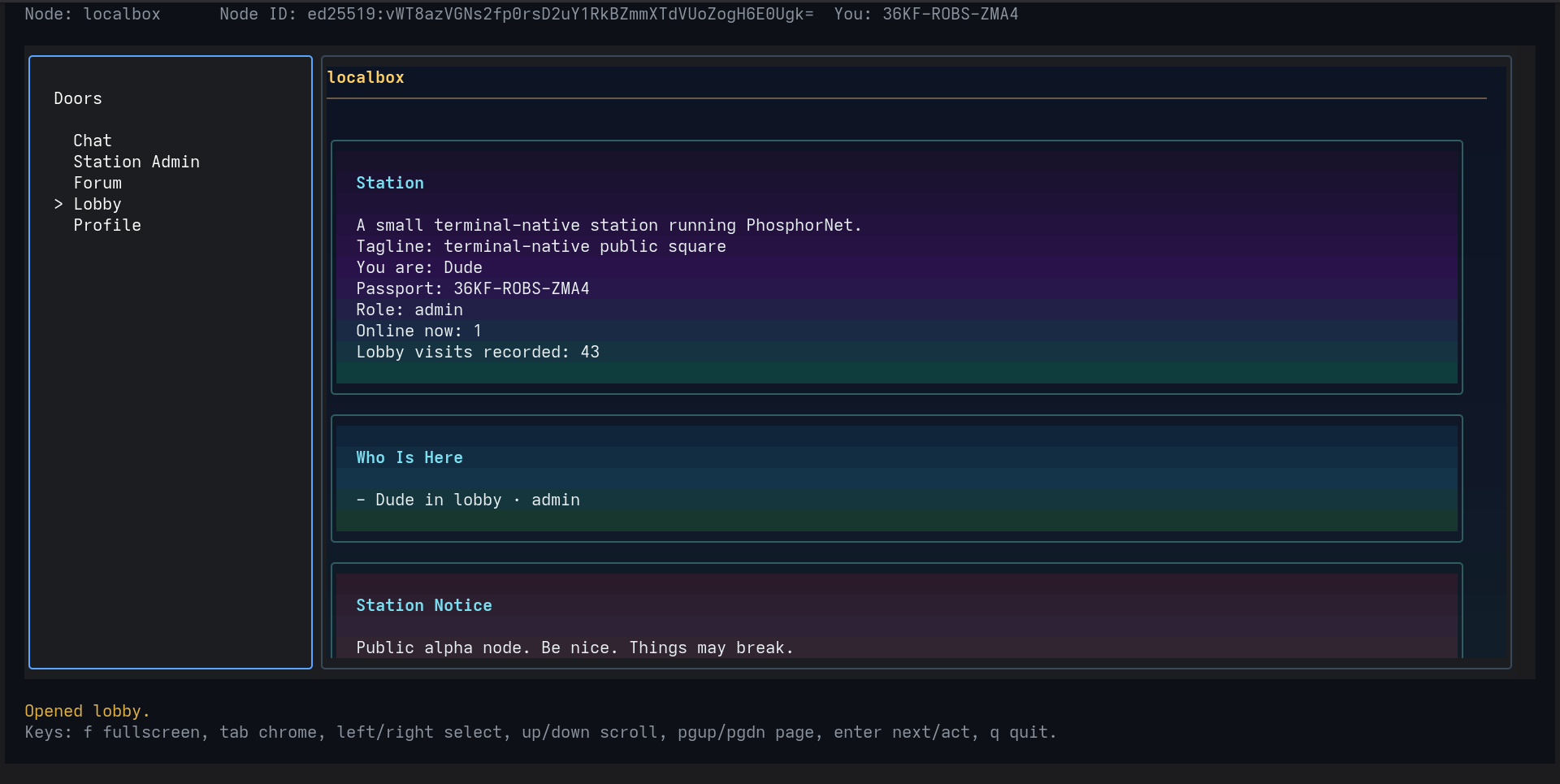
02 / Architecture
phosphor is the trusted terminal client. phosphord is the daemon that
hosts doors and handles station rules. switchboard helps nodes connect when direct
access is awkward.
03 / Stack
The stack is compact on purpose: Go for the binaries, Bubble Tea and Lip Gloss for the client, WebSocket for transport, JSON for screens, SQLite for persistence, TOML for config, and Ed25519 for identity.
| Layer | Choice | Why it fits |
|---|---|---|
| Client | Go + Bubble Tea | Single binary, fast startup, and a clean loop for terminal rendering. |
| Node | Go | Concurrency, networking, and easy static builds for stations. |
| Door runtime | Lua by default, stdio for Python or other languages | Embedded scripting for common doors without making every door a separate service. |
| Transport | WebSocket | Proxy-friendly and easy to inspect. |
| State | SQLite | Single-file persistence for personal and community stations. |
04 / Identity and trust
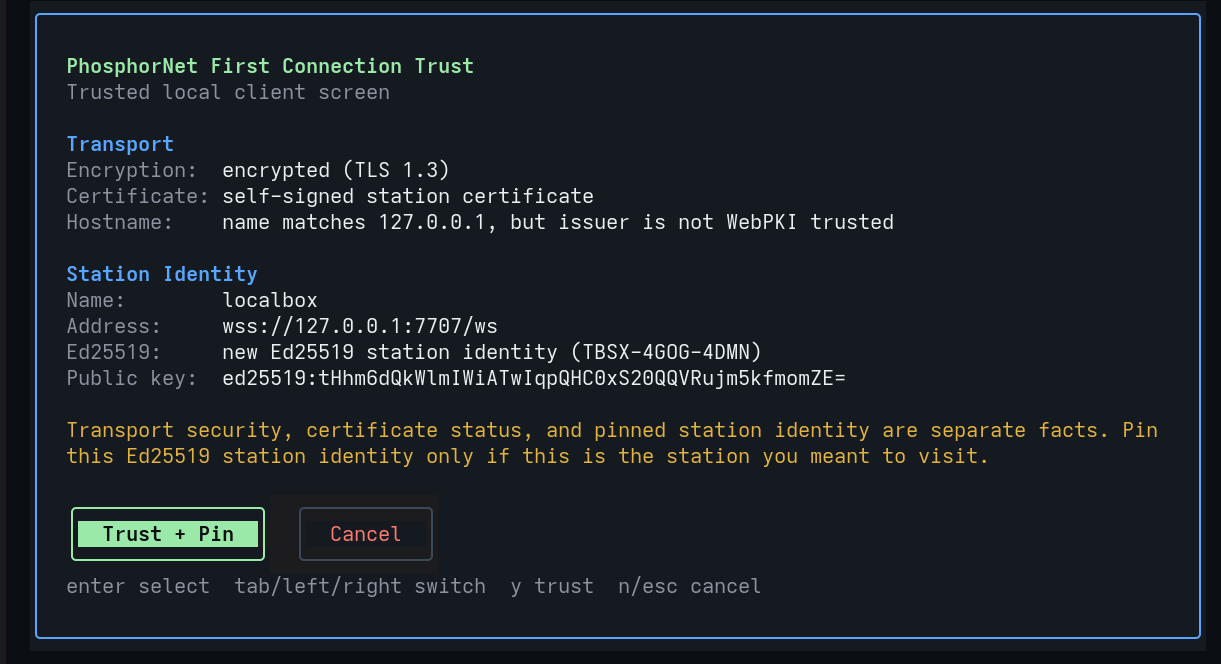
That split is deliberate. The client can accept a self-signed station certificate while still pinning the station's Ed25519 key separately. The trust prompt shows transport encryption, certificate status, hostname verification, and the station key as separate facts.
Your portable Ed25519 login key. The private key stays on your machine.
~/.config/phosphornet/passport.toml by default.The client keeps a per-address memory of station identity, like SSH known hosts.
~/.config/phosphornet/known_nodes.toml.TLS says whether transport is encrypted. The certificate says whether a hostname checks out. The pinned Ed25519 station key says whether this is the same station you saw before.
05 / Runtime notes
The runtime version is phosphornet.door.runtime.v1. Doors get a request, return a
response, and follow the same lifecycle hooks:
init, view, update, on_join, on_leave,
and tick.
{
  "contract_version": "phosphornet.door.runtime.v1",
  "door": { "id": "chat", "name": "Chat" },
  "lifecycle": "update",
  "ctx": {
    "session": { "id": "s1" },
    "user": { "public_key": "...", "fingerprint": "ABCD1234" },
    "node": { "id": "...", "name": "localbox" },
    "state": { "user": {}, "room": {}, "global": {} }
  },
  "event": { "kind": "action", "target": "chat-actions", "action": "send_message" }
}actionselectsubmitkeyfocususer - per user, per door.room - one room per door for now.global - node-wide door state that only admins can change.Reconnects are short-lived and explicit. If you drop and come back quickly, the node may reopen the old door, but scroll position, focus, and input drafts are not restored.
07 / Built-in doors
Chat is fast and noisy. The forum is slower and longer-lived. A forum thread is where the long post lives, with replies and moderation tools around it.
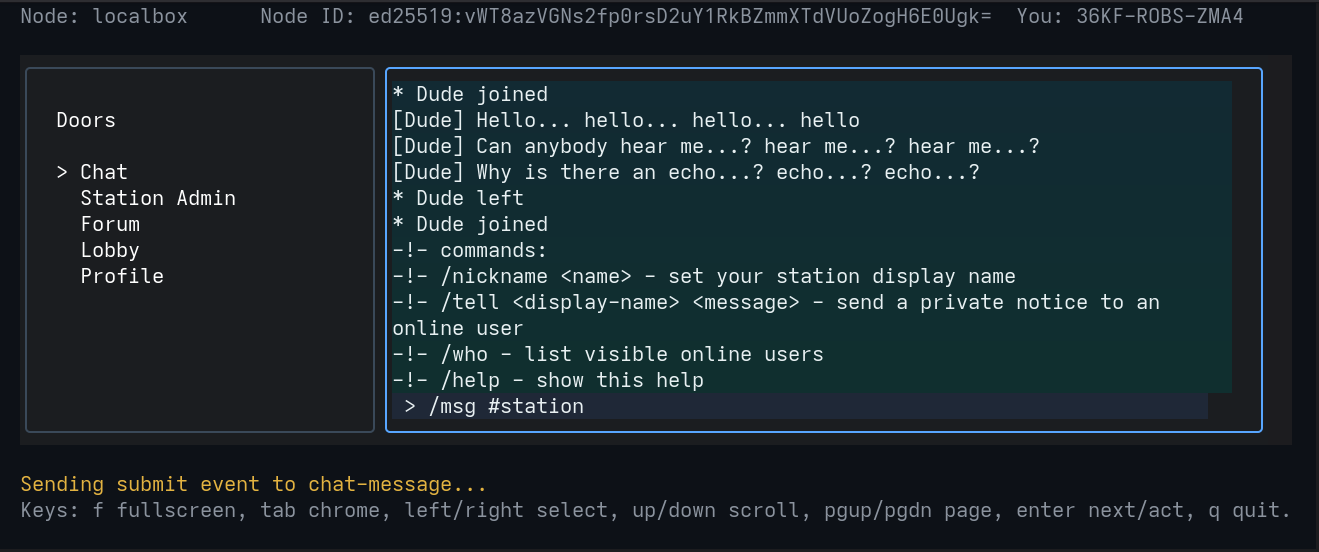
This is the fast room for back-and-forth talk. It feels more like an IRC channel than a feed, with commands, presence, and a live message line.
The point is to keep the conversation moving without making the interface feel like a web app.
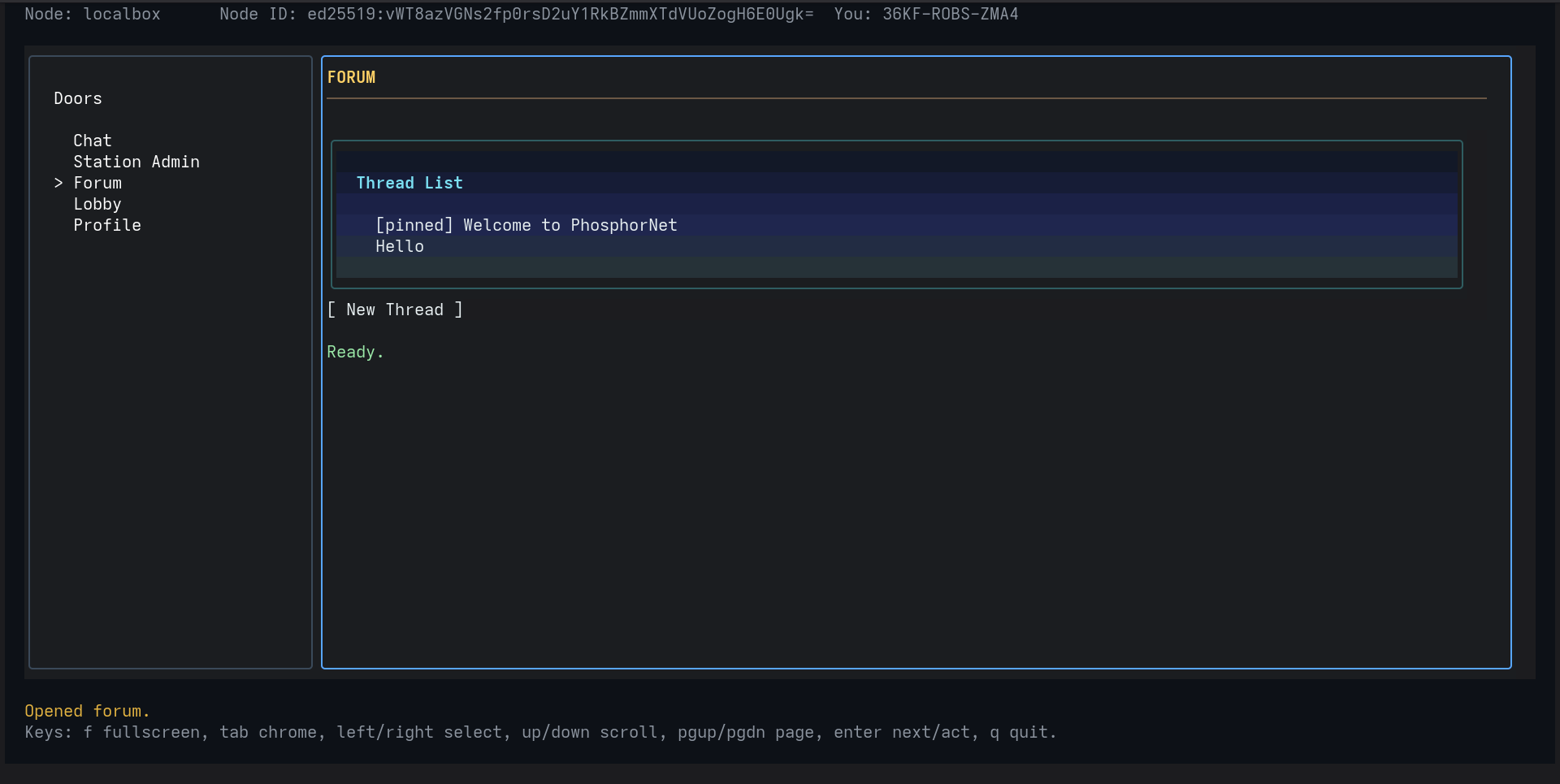
The forum is for slower posts, announcements, and threads that need space to breathe. It keeps the structure obvious: thread list first, then content.
It feels closer to an old-school board than a social timeline, which is the point.
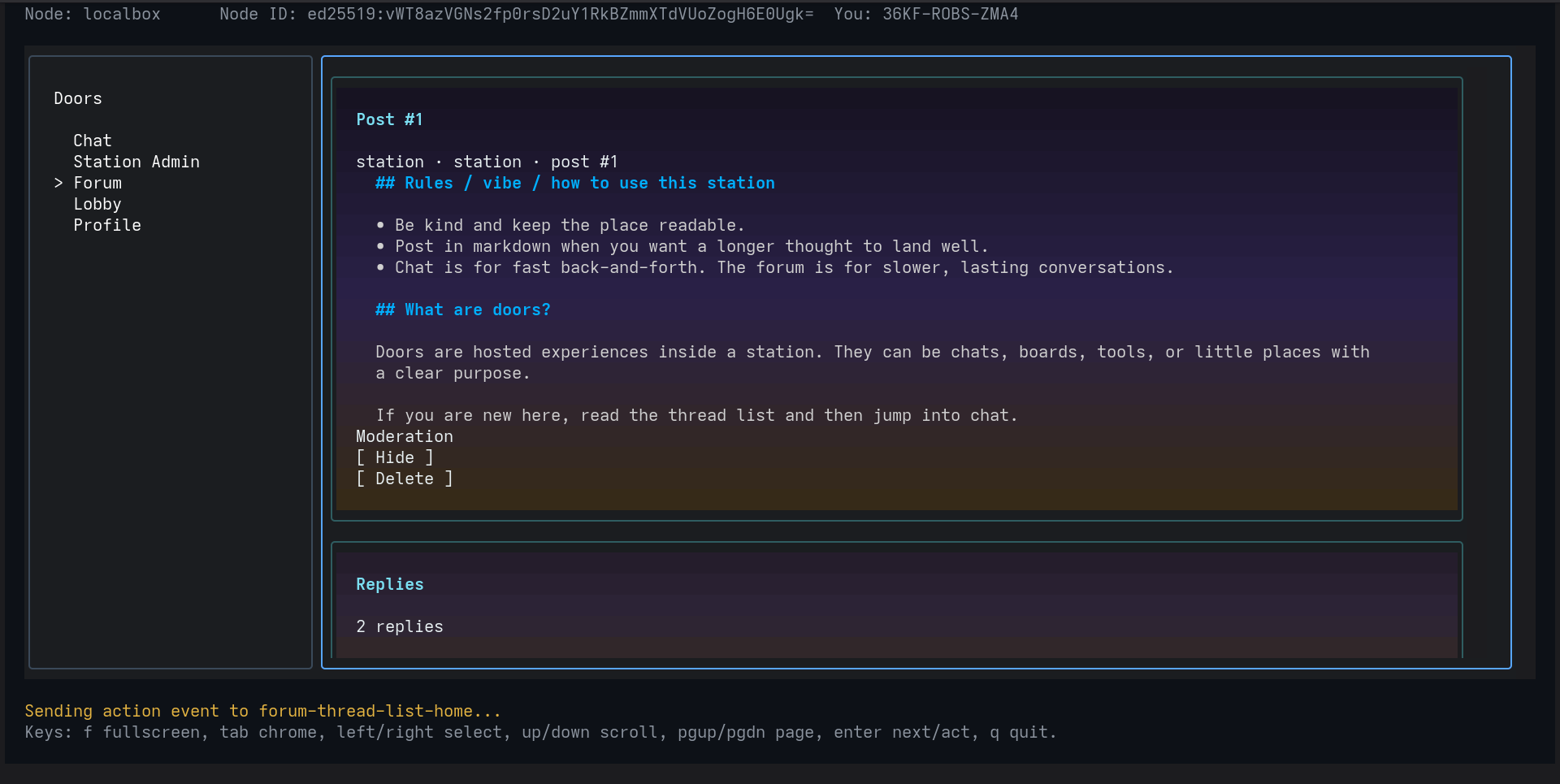
The thread view is where a post opens up into something you can read, answer, and moderate. Markdown lives here, along with replies and simple admin actions.
It is a small example of the project idea: a station can host a room that feels lived-in without becoming complicated.
08 / Configuration
The node config owns the station name, listen address, keys, doors directory, database path, access policy, and runtime defaults. Door manifests own the entry file, visibility, access, and settings.
name = "localbox"
listen_addr = ":7707"
doors_dir = "./doors"
database = "./phosphornet.db"

[access]
mode = "public"
admins = ["base64-ed25519-admin-public-key"]

[runtime]
default_runtime = "lua"public and invite_only are the current station access modes.09 / Door config
A door manifest tells the station what the door is called, where to load it from, who can open it, whether it shows in the rail, and what extra powers it can ask for. If the manifest is the front door sign, the settings are the knobs on the wall.
id = "chat"
name = "Chat"
entry = "app.lua"
visibility = "public"
access = "public"

[settings.topic]
type = "string"
label = "Room topic"
default = "phosphornet room"id gives the door its stable name.name is what people see in the rail.entry points at the door code.visibility decides whether it shows up.access decides who can open it.capabilities decide what it can ask the node to do.If a door is meant to be public, the manifest should say that plainly. If it needs an admin, a short allowlist, a custom topic, or a special capability, that should be obvious without hunting through the code.
10 / Podman
Stdio doors can run straight on the host when you explicitly trust them, but the safer path is to run them in a container with no network, a read-only filesystem, and tight resource limits. That keeps third-party doors from acting like tiny surprise daemons on your box.
Use this when you control the code and want the simplest local dev loop.
runtime = "stdio"
command = ["python3", "app.py"]

[isolation]
mode = "host"Use this when you want the station to launch the door inside a container instead of directly on the machine.
runtime = "stdio"

[isolation]
image = "localhost/phosphornet/weather-door:0.1.0"
network = "none"
read_only = true
timeout_ms = 1500
memory = "128m"
cpus = 0.25
pids_limit = 64Host mode is for trusted local work. Podman mode is for everything that should stay boxed in.
11 / Operations
SQLite stores users, roles, door state, station settings, moderation state, audit events, and admin
config. A real backup is more than the database: node.toml, the database, node key
material, and the door directory all travel together.
phosphord before a simple file backup.node.toml, the configured database, and doors_dir.phosphord database path=/srv/phosphornet/phosphornet.db schema_version=5Durable audit events, JSONL mirroring, maintenance mode, and the fact that deleting the node key makes the station a different identity even if the database survives are all part of the operator story.
12 / Test confidence
The test index maps release promises to package tests and integration coverage. It is a handy reality check because it shows what already works and where more work still matters.
Login checks, node key pinning, UI validation, state updates, broadcast fanout, and moderation flows.
Bad stdio output, Lua sandbox escape attempts, Podman isolation, and response parsing are covered.
Audit logging, admin checks, reconnect behavior, and manifest rejection are tracked explicitly.
13 / Install & Run
Install phosphornet binaries via the automated script, initialize a local station, and connect using the client.
# Client only
curl -fsSL https://aiyoyo.org/phosphornet/install.sh | sudo sh -s -- --client

# Station / Node only
curl -fsSL https://aiyoyo.org/phosphornet/install.sh | sudo sh -s -- --node

# All binaries
curl -fsSL https://aiyoyo.org/phosphornet/install.sh | sudo sh -s -- --full--uninstall --full (add --purge to clear config and database).
# phosphord init
phosphord serve
Starts the node listening on wss://127.0.0.1:7707/ws by default.
(The installer auto-runs init on first setup if config is missing).
Health check: curl -k https://127.0.0.1:7707/healthz should return ok.
phosphor init
phosphor connect wss://url_to_station
Initializes your passport and connects to the node. The first connection displays a local trust prompt before pinning the station's Ed25519 identity.
# Terminal 1: Station
phosphord init && phosphord serve

# Terminal 2: Client
phosphor connect wss://localhost
Test both sides on one machine using two separate terminal windows.